Complete Guide to Cat Photography Techniques | How to Take Eye-Catching Photos from Smartphone to Camera
A detailed guide to photography techniques that bring out the charm and personality of your beloved cat. Covers angles, lighting, shutter timing, and post-processing tips that work with both smartphones and DSLR cameras—a comprehensive resource for taking eye-catching cat photos that shine on social media.
Key Takeaways
A detailed guide to photography techniques that bring out the charm and personality of your beloved cat. Covers angles, lighting, shutter timing, and post-processing tips that work with both smartphones and DSLR cameras—a comprehensive resource for taking eye-catching cat photos that shine on social media.
Related Species
Many cat owners want to capture their beloved cat's cuteness and personality in photos and share them on social media. However, cat photography has unique challenges: quick movements, unpredictable behavior, and dim indoor lighting. Once you grasp the techniques, photos taken with either a smartphone or DSLR camera can improve dramatically. This article provides practical techniques to elevate the quality of your cat photography.
Light is the Key to Photo Quality
The single most important element that determines the quality of a photograph is "light." Whenever possible, use natural light.
Direct sunlight creates too much contrast, so diffused light filtered through a thin curtain is ideal. Light coming through a window during late morning to early afternoon has stable color temperature and reproduces your cat's fur color naturally.
The direction of light significantly changes the atmosphere of your photo.
- Side Lighting (light from the side): The texture of the fur stands out, creating a three-dimensional effect
- Backlighting (contre-jour): The edges of the fur catch light, creating silhouettes or dreamy, atmospheric photos
- Front Lighting (light from the front): The entire face is evenly illuminated, which is ideal for emphasizing the sparkle in the eyes
When using indoor lighting, daylight white bulbs (around 5000K) reproduce your cat's fur color more accurately than warm white bulbs. Avoid using flash if possible, as it startles the cat and changes their expression, and the reflective layer behind the eye (the tapetum) often makes the eyes glow in the photo.
Basics of Angle and Composition
Shoot Low to Match the Cat's Eye Level
Shooting from above while standing makes the cat appear small and makes their expression harder to see. By getting down to an angle where you're lying on the ground, the cat takes up the frame with impact, and the background naturally blurs more beautifully. This single change can transform the photo, making it one of the most effective improvements you can make.
Use the Rule of Thirds to Frame Your Shot
Placing the subject in the center of the frame often results in a plain composition. By positioning your cat's eyes or face near the intersections created when dividing the frame into thirds both vertically and horizontally, you'll achieve a naturally balanced composition. Enabling the grid lines in your smartphone's camera settings makes it easier to keep the rule of thirds in mind.
Leave Space in the Direction of the Cat's Gaze
When your cat is looking out the window or following something in profile, leaving space in the direction they're looking creates a photo with lingering resonance—one that makes viewers imagine "what comes next?" The basic principle is to place negative space in the direction the cat is facing.
Tips to Maximize Smartphone Photography
Smartphone cameras improve every year, and thoughtful adjustments to your settings can produce next-level photos.
Capture the Perfect Moment with Burst Mode
Cats move fast, and their best expression can disappear in the time it takes to press the shutter once. With burst mode, you can select the best shot from multiple frames.
| OS | How to Use |
|---|---|
| iPhone | Swipe the Shutter button to the left |
| Android (Standard Camera) | Press and hold the Shutter button, or enable Burst Mode in Settings |
Use Portrait Mode to Blur the Background
Portrait mode makes it easy to achieve background blur that makes your cat stand out as the subject. If you're too close to your cat, the effect won't work well, so shooting from about 50–100 cm away is recommended.
Utilize AF/AE Lock
By long-tapping on your cat's face to lock AF/AE, the focus and exposure stay locked even if your cat moves slightly. Even in dim lighting, you can adjust exposure to match your cat's fur color, preventing failures like blown-out whites or crushed blacks in the face.
DSLR and Mirrorless Camera Settings
Set Shutter Speed Fast
To photograph a moving cat without blur, aim for 1/250 second or faster. For scenes with running or jumping, you may need 1/500–1/1000 second. When indoor light is limited, raise the ISO or open up the aperture to compensate for the lack of light.
Balance Aperture Value and Depth of Field
The smaller the f-number, the more the background blurs, making your cat stand out. A fast lens with f/1.4–f/2.8 is ideal, but if the aperture is too wide, you may find the nose is out of focus even when the eyes are sharp. Try starting around f/2.0–f/3.5 and experiment to find the settings that keep your cat's entire face sharp.
Use Animal Face and Eye Recognition AF
Many modern mirrorless cameras have AF features that automatically track an animal's face and eyes. Even as your cat moves around, it keeps focus on their eyes, dramatically improving the success rate of action photography. Major manufacturers such as Sony, Canon, Nikon, and Fujifilm offer compatible models. Enabling "Animal Priority" or "Eye AF" in the settings menu increases your success rate when photographing cats.
Choosing Scenes to Showcase Your Cat's Beauty
Observe Your Cat's Routine and Wait
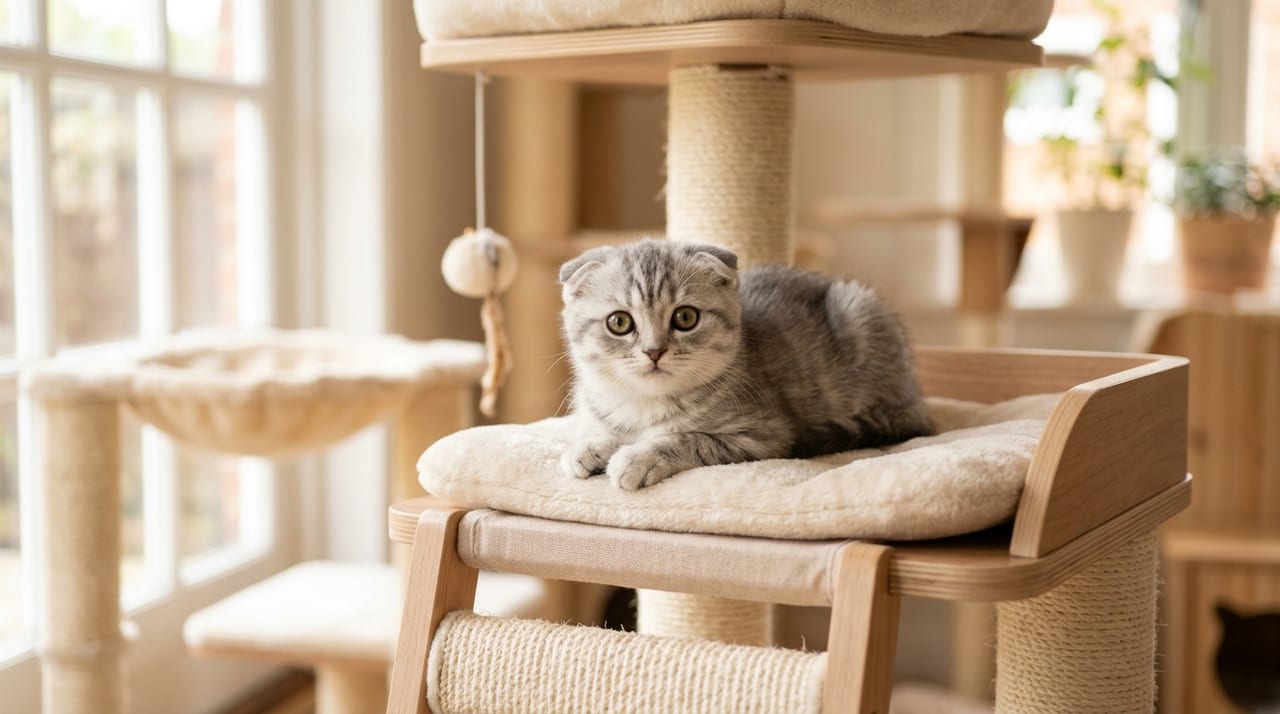
Cats tend to do the same things in the same place at the same time. By noting your cat's favorite sunny windowsill for sunbathing, the spot where they groom after eating, or the top of the cat tower they visit in the evening, you can be ready to capture natural expressions. You don't need to hold the camera the whole time—pick a location, then quietly wait for your cat to arrive. This approach is effective.
Aim for the Sparkle in the Eyes
When light reflects in the pupil (a highlight), your cat's eyes look impressively bright. Find the angle where window light catches the eyes, position yourself there, and wait for the moment your cat turns their face toward you. In dim locations, pupils dilate more, and the sparkle when light hits them is particularly beautiful.
Control the Cat's Gaze and Movement with Toys
By moving a cat toy just beside your camera, you control your cat's gaze and focus. You can deliberately create dramatic scenes—the serious expression when there's prey in front of them, or their graceful posture just before a jump. If someone else can operate the toy, you can concentrate on shooting and improve your success rate.
Post-Shooting Finishing and Notes on Sharing to Social Media
Make Subtle Corrections with Apps
Using apps like Lightroom Mobile, Snapseed, or VSCO to subtly adjust exposure, contrast, and color temperature alone will improve the finished quality of your photo. Excessive filters or over-sharpening damage the natural texture of the fur, so aim for corrections that preserve the original atmosphere. White and black cats are especially prone to blown highlights or crushed shadows, so be careful with exposure adjustments.
Checklist Before Posting to Social Media
Cat photos are loved by many, but make it a habit to check privacy and safety.
- Does the photo reveal your home's exterior, house number, or address?
- Does the photo's metadata (Exif information) contain location data?
- Is your cat's collar tag showing their name or phone number in a readable way?
You can remove location information from your photo management app or the editing screen before posting. Making it a habit to deliberately exclude information that could identify your home protects both your beloved cat and yourself.
Your cat photography will improve significantly when you focus on three elements: light, angle, and timing. Even without expensive equipment, you can take wonderful photos by maximizing your smartphone's features. Start by shooting at cat eye-level near your home's window. BreederDirect features information on various cat breeds, so enjoy capturing your cat's beauty in photos while spending time with your feline companion.